How to Download & Install Sajest on macOS
Step-by-step guide to installing Sajest on Mac, both Apple Silicon and Intel, plus fixes for common issues including the "damaged app" Gatekeeper warning.
Sajest is a native macOS app. This guide walks you through downloading, installing and troubleshooting it.
Which version do I need?
Sajest needs macOS 13 Ventura or later and runs on both kinds of Mac:
| Your Mac's chip | Download |
|---|---|
| Apple Silicon (M1, M2, M3, M4 or later) | Sajest_<version>_aarch64.dmg |
| Intel | Sajest_<version>_x64.dmg |
Not sure? Click the Apple menu → About This Mac. If the Chip line starts with "Apple", you have Apple Silicon. If it shows a Processor line with "Intel", you have an Intel Mac. The Download section suggests the right one automatically.
Installation Steps
1. Download the DMG
Go to the Download section and click the button for your Mac. The .dmg file saves to your Downloads folder.
2. Open the DMG
Double-click the .dmg file. A window opens showing the Sajest app icon.
3. Drag to Applications
Drag the Sajest icon into the Applications folder shortcut in the window.
4. Launch Sajest
Open Finder → Applications → Sajest and double-click to launch.
Common Issues & Fixes
"Sajest is damaged and can't be opened"
This is the most common issue. macOS Gatekeeper blocks apps not signed with an Apple certificate. It does not mean the app is actually damaged.
Fix — Option A (right-click method):
- Right-click (or Control-click) the Sajest app in Applications
- Select Open from the menu
- Click Open in the dialog that appears
Fix — Option B (Terminal):
xattr -cr /Applications/Sajest.app
Then launch normally.
"Sajest cannot be opened because the developer cannot be verified"
Same root cause as above — Gatekeeper blocking an unsigned app.
Fix:
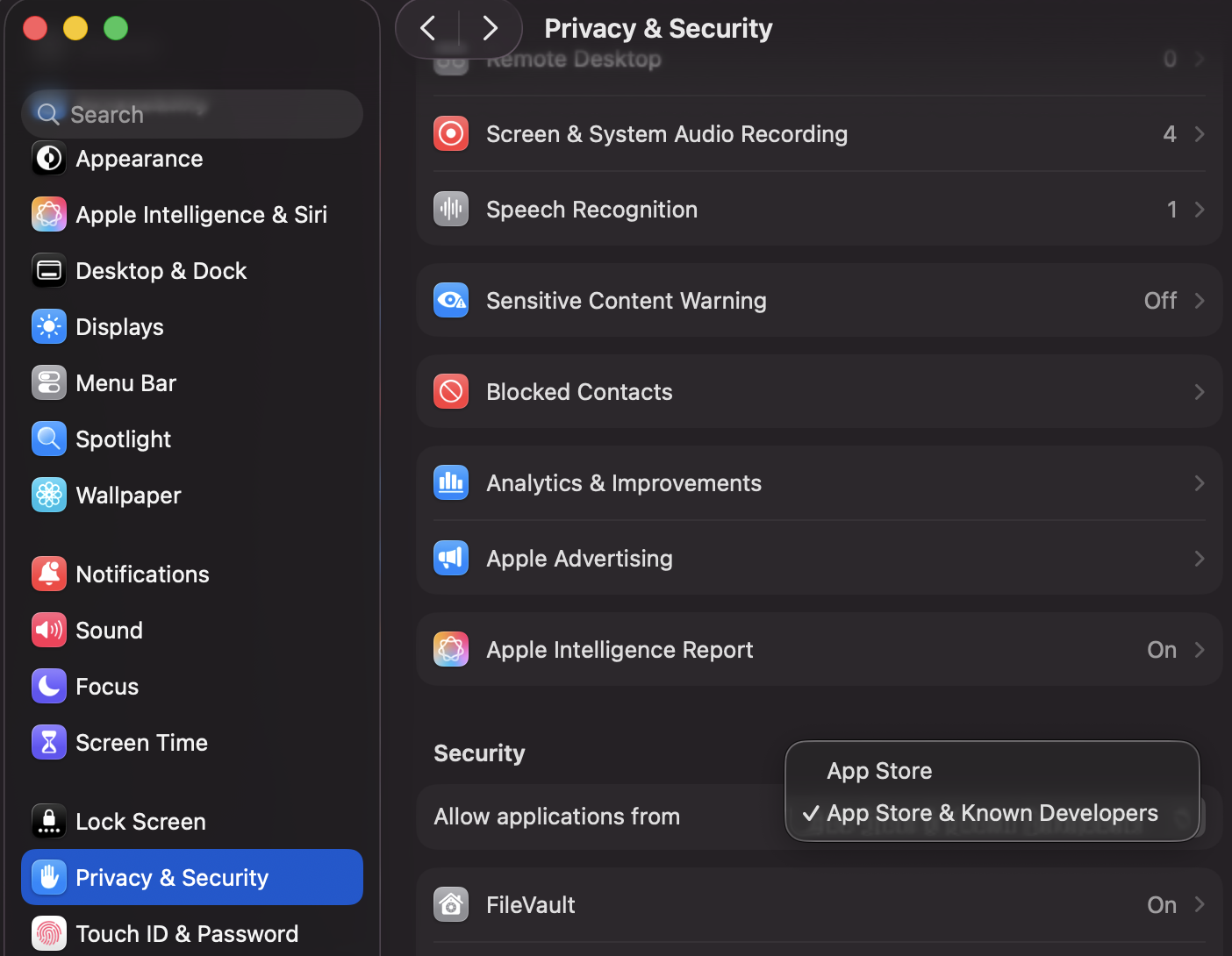
- Go to System Settings → Privacy & Security
- Scroll down to the Security section
- You'll see "Sajest was blocked" — click Open Anyway
Make sure Allow applications from is set to App Store & Known Developers:
App won't launch after install (blank screen or instant quit)
Fix:
- Quit Sajest completely (
Cmd+Q) - Open Terminal and run:
rm -rf ~/Library/Application\ Support/com.sajest.app
- Relaunch Sajest
This clears corrupted local data from a previous install.
Wrong version ("not supported on this Mac", or the app is slow)
The Apple Silicon build won't open on an Intel Mac, and the Intel build runs slowly through Rosetta on Apple Silicon. Check your chip under Apple menu → About This Mac, then download the matching version from the Download section and drag it into Applications, replacing the old copy.
Microphone/Screen permission denied
Sajest needs screen recording access to assist during sessions.
Fix:
- Go to System Settings → Privacy & Security → Screen & System Audio Recording
- Enable the toggle for Sajest
- Restart the app
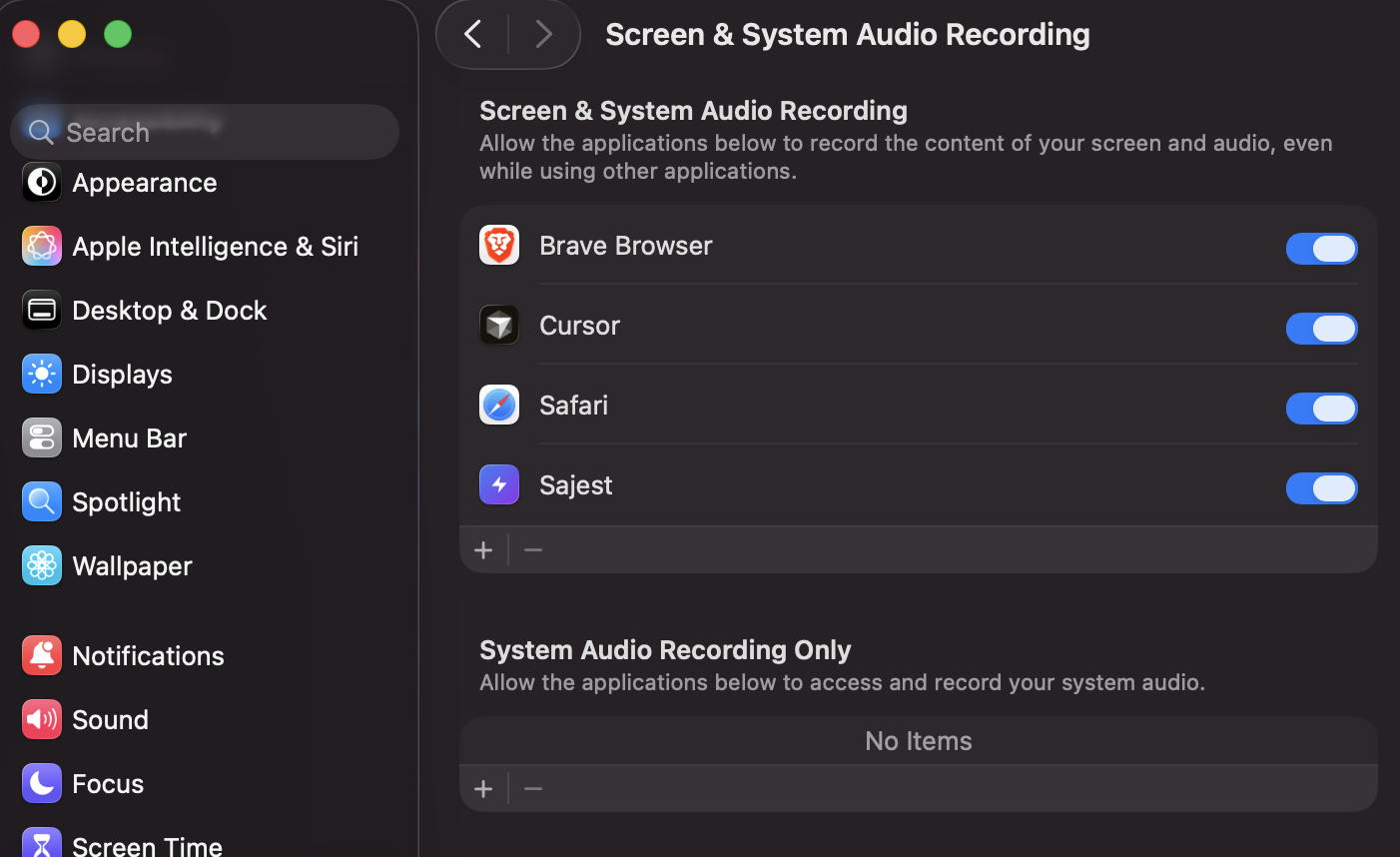
Repeat the same for Microphone if audio capture isn't working.
If nothing above works
The exact error message is usually the fastest way to find the right fix.
- Copy the complete error message exactly as it appears. If you cannot copy it, take a screenshot.
- Paste the error into Google inside quotation marks, followed by
macOSand your Mac chip. For example:
"paste the exact error here" macOS Apple Silicon
- If you still cannot solve it, email support@sajest.com and paste the error or attach the screenshot. Include your macOS version, your Mac chip (for example M2), and the step where the problem happened.
Avoid sharing passwords, login codes, payment information, or other private data when pasting an error online.
How to uninstall
- Quit Sajest
- Drag
/Applications/Sajest.appto Bin - Remove app data (optional):
rm -rf ~/Library/Application\ Support/com.sajest.app
rm -rf ~/Library/Logs/com.sajest.app